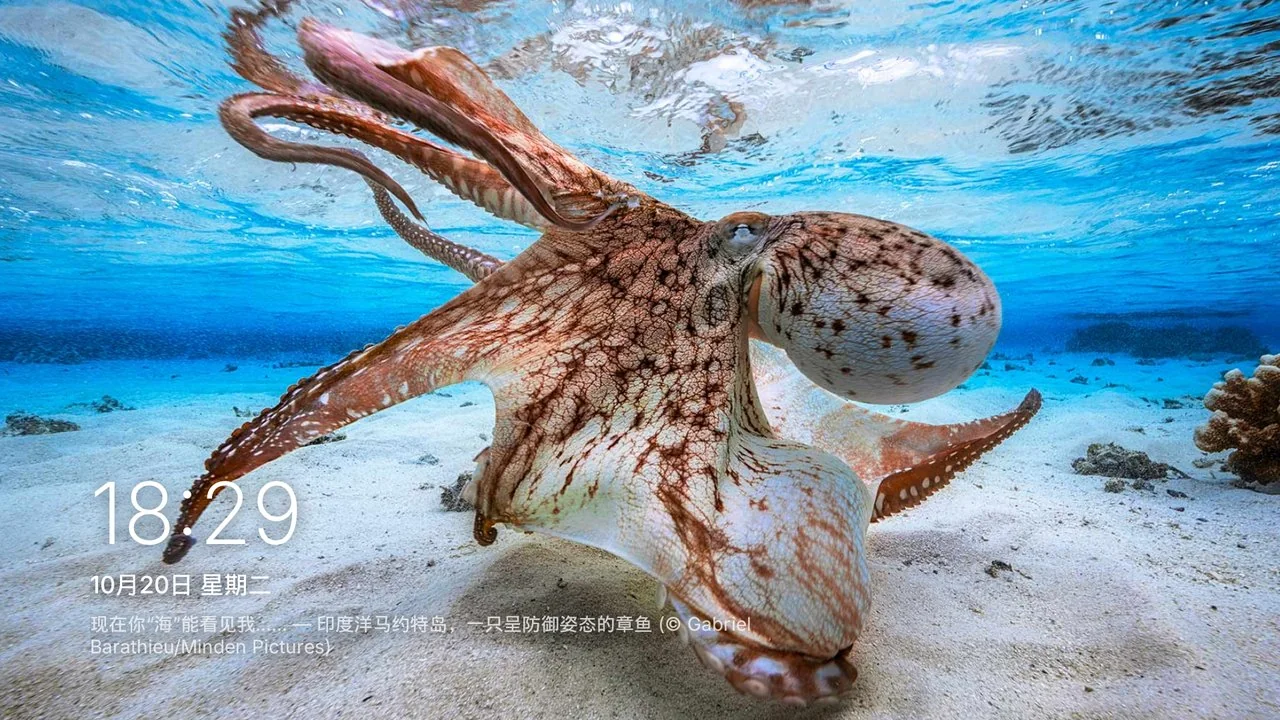
Turn the Android TV you already own into something closer to tvOS: a sunken liquid-glass dock, a Top Shelf that actually plays something, and Apple TV aerial films drifting across the screen when the room goes quiet.
When the TV goes quiet it drifts over the planet instead: coastlines, glaciers and city lights unfold with the location name following each shot. Use the arrow keys to change scene; offline it falls back to photos, and it never interrupts something already playing.
Aerial screensaver (motion illustration, not a capture)
Choose aerial films as the screensaver content; they stream from Apple's servers at roughly 15–20 Mbps
Offline or on a failed buffer it falls back to the photo frame, without blocking the next idle transition
After 1–30 minutes of idle time the photo frame appears, with the clock and caption moving periodically to protect OLED panels
Aerial films stream from Apple's servers; canvasOS ships none of them. “Apple TV” is a trademark of Apple Inc. This project is not affiliated with Apple.
FEATURES
Designed for ten feet, not for a phone.
Bigger focus, fewer layers, quieter glass — laid out again for the room instead of scaled up from a handset.
01LIQUID GLASS DOCK
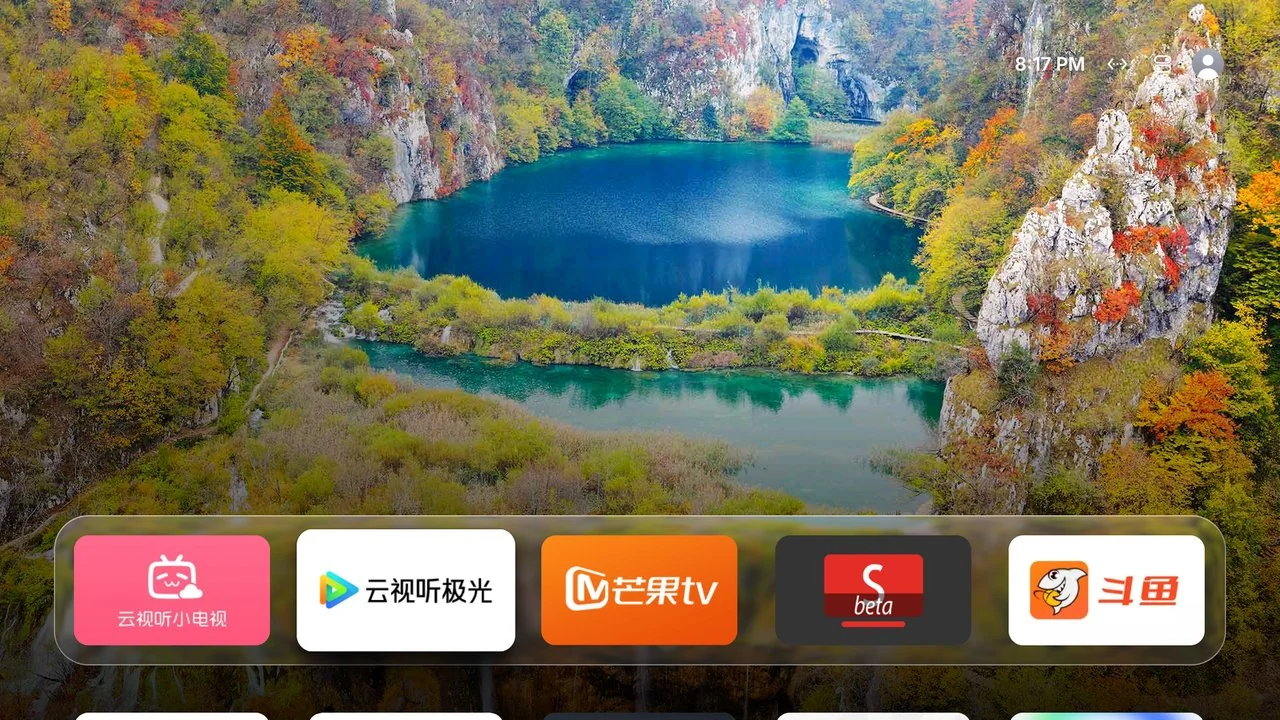
A dock that sinks into the picture
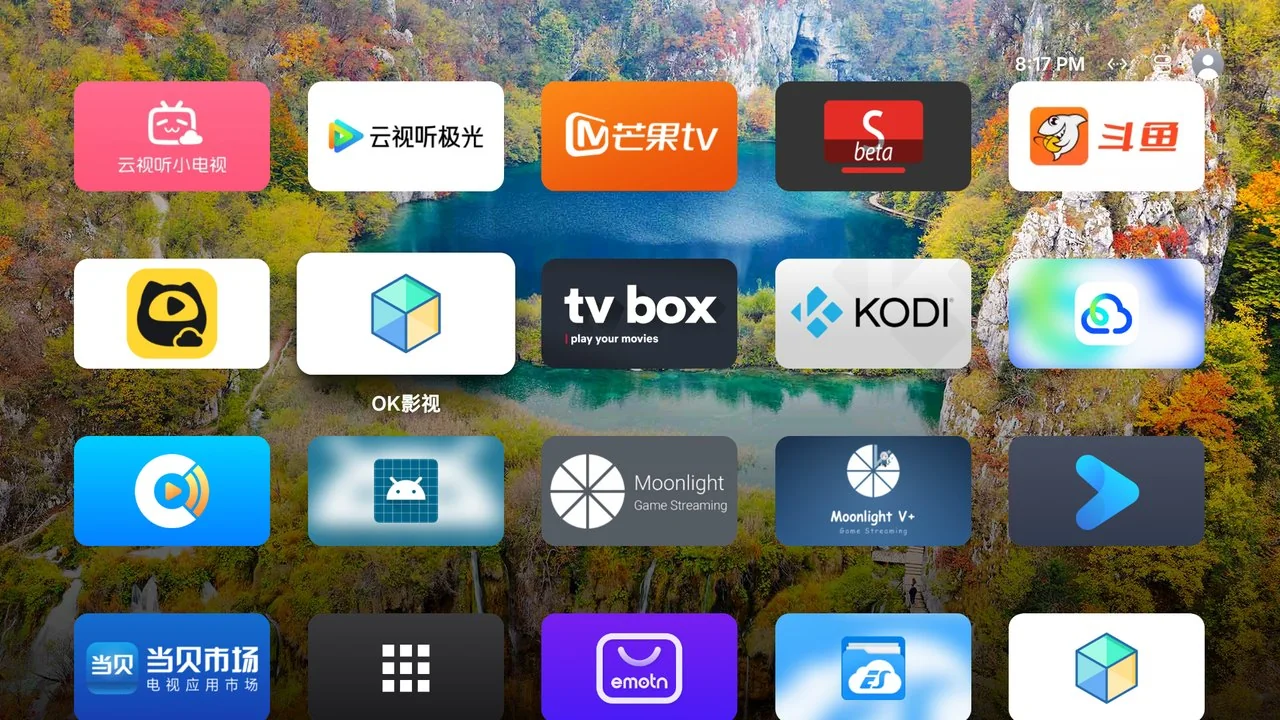
The first row sits on a sunken glass plate; the next row shows only its top edge. Press Down to reveal every app, or leave the screen to the wallpaper.
Five 16:9 rounded tiles that scale and tilt with a soft shadow on focus
Long-press to edit, then move tiles into the dock with the D-pad; Recents or Fixed, your choice
Blur, edge refraction and highlights are precomputed per wallpaper on the CPU
Home screen · Sony BRAVIA capture
02TOP SHELF
Focus an app and the top half starts living
When the focus lands on a dock app, the upper half cycles through its content, one picture every 8 seconds; OK opens the app. What the app publishes itself comes first, then what is popular right now.
The “Continue watching” row that Netflix, YouTube, Prime… publish for the Android TV home screen, read on the TV (READ_TV_LISTINGS grant)
Otherwise, this week's popular titles in France from TMDB for Netflix, Prime Video, Disney+, Apple TV, Max, Paramount+, Canal+ and Crunchyroll, with your own free API key
Last, Bilibili trending videos and Douyu live rooms (public web endpoints, no account)
Top Shelf · real capture, Bilibili source
03CONTROL CENTER
One Back press away
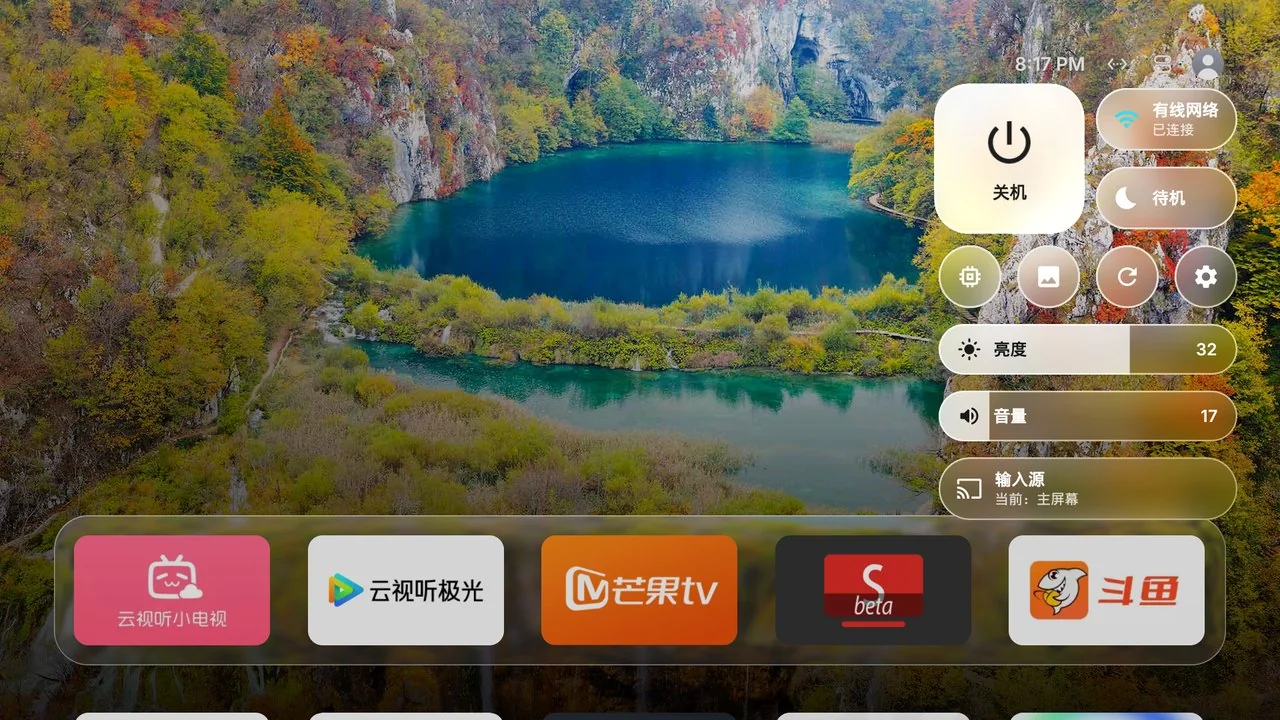
No enclosing panel — just floating liquid-glass controls over a live blur of the wallpaper.
Network (with the IP address), standby with a timer, power, restart, memory, photo frame, settings
Five-day weather, Bluetooth and, if you turn it on, Now playing
Brightness and HDMI input appear only where the TV exposes them
Android 12+ reuses a shared GPU blur layer; older systems sample the wallpaper
Control Center · floating glass controls
04WALLPAPER & FRAME
When the TV is quiet, make it a window
Bing daily photos, landscapes from Wikimedia Commons and NASA, cute animals, masterpieces from the Met and the Art Institute of Chicago, anime, your own photos sent from a phone, your own image links, or a colour gradient — rotating every 15 minutes to once a day.
Every choice is shown as a picture and picked with one press; the Met and Art Institute works are public domain
The frame pans and zooms slowly, moving the clock to protect OLED panels; it can also show Apple TV aerial films (see above)
Set it as the system screensaver after 1–30 minutes of idle time
All apps · grid layout
And everything version 1.1 adds.
Content
Top Shelf fed by Android TV The “Continue watching” row that Netflix, YouTube, Prime… publish for the Android TV home screen: canvasOS reads it on the TV (READ_TV_LISTINGS grant) and shows it above the dock, nothing else; the apps’ personalised recommendations are not used. Without the grant, nothing is read. Can be switched off in the settings.
Popular titles from TMDB For Netflix, Prime Video, Disney+, Apple TV, Max, Paramount+, Canal+ and Crunchyroll: this week's popular titles in France according to TMDB. TMDB asks each user for a free API key, which you paste from the phone page; it stays on the TV.
Weather The temperature next to the clock and a five-day forecast in the Control Center, from Open-Meteo (no key). On by default; until you pick a city, the TV guesses the place once from its public IP address. Can be turned off.
Control Center
Now playing On by default. Under “Source”, the title, artist and cover of what an app is playing, with play/pause, skip and a timeline; a long press on OK opens the large player. Only media-session metadata is read, no notification.
Notification banners On by default. Notifications from your apps (doorbell, smart home, messages…) show for 6 seconds at the top right, on the home screen and over the app you are watching; exclude any app you like. Title and text are read for that, nothing is stored.
Bluetooth A button under Weather: it shows the connected device, with its battery when it reports one, and lists the devices already paired. One press connects or disconnects a headset or speaker; pairing happens in the TV's own Bluetooth settings.
Sleep timer From the standby button: now, or in 15 min, 30 min, 1 h, 1 h 30, with a warning a minute before if the home screen is showing. It needs on-device debugging and does not survive a restart.
Smarter memory cleanup Apps in use are spared: those playing audio or video, those running a foreground service (screen casting, Plex, Jellyfin, VPN), and active accessibility services and keyboards. Settings → Dernier nettoyage lists what was closed.
Phone page
A page that is always there Scan the QR code in Home settings → Phone page with a phone on the same Wi-Fi: nothing to install. It picks the wallpaper, the screensaver, the boot animation and the weather city, and takes the TMDB key.
Remote control and keyboard The phone becomes a remote with a keyboard. It goes through the TV's on-device debugging, which you must have allowed once.
Install APKs Send an APK from the phone to the TV. It is never the first install of canvasOS. On TCL, the system verifier may refuse this method.
Tile pictures and names For each home app: change the name, pick a picture (up to 20 MB, cropped to 16:9), go back to the original picture, hide or show it. A long press on a tile also offers Rename, on the TV itself.
A code in the address That code is the page's only protection: Regenerate the code makes old addresses unusable (lost phone), and the Phone page line turns the page off entirely.
Personalisation
Profiles and a child profile Each profile has its own home: app order, hidden apps, folders, names and wallpaper. A child profile asks for a PIN to switch profile, open the home settings or delete an app. The PIN itself is not stored, only a salted hash.
Folders, tvOS style Long-press an app: “Nouveau dossier…”. OK opens the folder over the home screen, Back closes it. A folder can be renamed, moved like an app (dock included) and deleted without losing its apps.
Dock: Recents or Fixed Recents: the app you just opened moves to the front of the home screen. Fixed: the order you chose with “Modifier l'accueil” is kept.
Wallpaper sources from everywhere Bing, Wikimedia Commons, NASA, the Met and the Art Institute of Chicago, on top of your own photos and links. The defaults are tuned for Europe: Bing daily photos in French, TMDB titles for France, the clock in the TV's own format.
Install
In-place updates The APKs are signed with a stable key: adb install -r updates canvasOS and keeps its settings and grants. Only 1.0.0, signed with a throwaway key, needs one last uninstall.
Update from the TV Home settings → System → Mise à jour: the first press looks for the latest Release, the second downloads and installs it in place. canvasOS also checks once a day and announces it under the Control Center; nothing is downloaded without your second press.
A simple first launch The TV offers to enable the features that need on-device debugging (standby, power, memory cleanup): press Commencer, tick “Always allow” once, and that is it.
The IP address on screen The TV's address and the ADB debugging state show in Home settings → System, and the address under “Network” in the Control Center: no more digging through the TV's own settings.
BEFORE / AFTER
Drag to reveal the difference.
The left side is an illustration of the before state, not a capture of the same TV. The right side is a real capture from canvasOS on a Sony BRAVIA. Drag the divider.
BeforeIllustration · not the same TV
AftercanvasOS · real capture
Drag, click, or focus the handle and use ← →. Hold Shift for larger steps; double-click to reset.The before image is an illustration of a generic launcher, not a capture of the same TV.
SCREENSHOTS
Every image comes from a real TV.
Sony BRAVIA XR-55A80J, Android TV 12, original 1280 × 720 captures and screen recordings, all taken on that TV; some 1.1 additions are not in them yet. Select one to enlarge.
Home screen home.jpgTop Shelf shelf.jpgSettings settings.mp4Control Center cc.mp4Photo frame frame.jpg
INSTALL
A better home screen, step by step.
You need a computer on the same Wi-Fi as the TV, the TV's IP address and ADB debugging enabled — the first time only. Android 9+, no root. After that, canvasOS updates from the TV.
Before you start: the TV is on the same network as the computer, ADB debugging is enabled, and the first connection shows “Allow USB debugging?” — tick “Always allow”. The computer needs Android SDK Platform-Tools. The APKs are signed with a stable key: from 1.1 on, an update installs in place and loses nothing.
Let an AI agent do it (recommended)
Send this message with the repository link to an agent that can run commands (Codex, Claude Code and similar). It confirms your brand and IP, installs, verifies and keeps a way back to the stock home screen.
Follow https://github.com/getisolated/canvasOS/blob/main/AGENTS.md and install canvasOS on my Android TV. First confirm my TV brand and IP address, then install and verify step by step, and keep a documented way to restore the original home screen. Do not disable the system launcher without my confirmation.
The TV shows two or three permission dialogs; choose “Allow” with the remote. On TCL, choose “同意” when the T-Cast push prompt appears.
Enabling ADB debugging by brand
TV
How to enable ADB
Xiaomi / Redmi
Settings → About → Product model: press OK until developer mode is on. Then Settings → Accounts & security: enable ADB debugging and Install unknown apps.
TCL / FFalcon
Settings → About → Device info: press Up, Down, Left, Right within one second. A More group appears; enable ADB.
Sony BRAVIA
Settings → System → About → press OK on Build seven times. Then Settings → System → Developer options → USB debugging.
Stock Android TV / Google TV, Google-certified boxes
Settings → Device Preferences → About → press Build seven times. Then enable USB debugging (sometimes “Network debugging”).
Every snippet has two forms — pick your system above. Windows PowerShell uses curl.exe instead of the curl alias and python instead of python3; macOS / Linux use the system curl and python3. No snippet relies on a shell variable and the package name is always written as com.getisolated.canvasos in full, so a partial copy still runs.
192.168.x.x is a placeholder for your TV's IP address. In the BRAVIA step, PIN is the four-digit code shown on the TV; type it in place of the placeholder.
Sony BRAVIA
The fully verified path, including brightness, TV volume and HDMI input status. Replace 192.168.x.x with the TV's IP.
Connect
Accept “Allow USB debugging?” on the TV and tick “Always allow”.
Record the original home, screensaver and accessibility services
You need them if you ever uninstall; save the output somewhere safe.
adb -s 192.168.x.x:5555 shell cmd package resolve-activity -a android.intent.action.MAIN -c android.intent.category.HOME
adb -s 192.168.x.x:5555 shell settings get secure screensaver_components
adb -s 192.168.x.x:5555 shell settings get secure enabled_accessibility_services
If 1.0.0 is already installed: uninstall it, once
Only 1.0.0, signed with a throwaway key, is concerned: every later release shares one key and updates in place with adb install -r, keeping settings and grants. An APK you built on another computer is the same case. This uninstall erases the app's settings and grants: skip the step if nothing is installed, and redo the following steps afterwards. The guard is switched off first so the accessibility list goes back to its recorded value.
Windows PowerShell: use `curl.exe -L -o canvasOS.apk …`. Later releases install over it with the same command.
Make it the home screen and grant permissions
The five grants cover the guard and screensaver, Control Center Bluetooth (Android 12+), reviving after the system kills the app, opening the home screen from the background after boot, and the Top Shelf. On Android 11 and older, BLUETOOTH_CONNECT answers “unknown permission”: ignore it; READ_TV_LISTINGS is refused harmlessly where the TV has no TvProvider.
Needed for brightness, TV volume and HDMI input status. The TV shows a four-digit PIN after the first command; use it in the second.
$body = '{"method":"actRegister","id":1,"version":"1.0","params":[{"clientid":"tvhome:1","nickname":"TVHome","level":"private"},[{"value":"yes","function":"WOL"}]]}'
curl.exe -s http://192.168.x.x/sony/accessControl -d $body
# The TV now shows a 4-digit PIN. Replace PIN with it and run:
curl.exe -s -u ":PIN" http://192.168.x.x/sony/accessControl -d $body
This step uses a shell variable, so it only works in the macOS / Linux terminal.
First launch: allow on-device debugging on the TV
On first launch the TV offers to enable the features that need on-device debugging: standby, power and deep memory cleanup. Press “Commencer”: the TV shows “Allow debugging?”, this time from the TV to itself; tick “Always allow”, then Allow. If you choose “Plus tard”, the request comes back in the home settings, under System → Débogage local.
On first launch the app downloads its background photos: a gradient may show for the first minute.
You should see a compact clock, two round controls and the glass dock.
Afterwards, without a computer: phone page and updates
Home settings → Page téléphone → Afficher le QR code: scan it with a phone on the same Wi-Fi to change the wallpaper, import photos, rename apps, or use the phone as a remote with a keyboard (which needs on-device debugging). Later updates run from Home settings → System → Mise à jour: the first press checks, the second downloads and installs in place.
TCL / FFalcon
TCL firmware rejects every adb install and any APK that declares a home screen. Push the guard build through the TV's own T-Cast service instead.
Some TCL / FFalcon firmware has no usable backlight interface, so the brightness slider hides, and the input row opens TCL's own source picker. That is a firmware limit, not a failed install.
Record the original home, screensaver and accessibility services
adb -s 192.168.x.x:5555 shell cmd package resolve-activity -a android.intent.action.MAIN -c android.intent.category.HOME
adb -s 192.168.x.x:5555 shell settings get secure screensaver_components
adb -s 192.168.x.x:5555 shell settings get secure enabled_accessibility_services
If 1.0.0 is already installed: uninstall it, once
Only 1.0.0, signed with a throwaway key, is concerned: every later release shares one key and updates in place with adb install -r, keeping settings and grants. An APK you built on another computer is the same case. This uninstall erases the app's settings and grants: skip the step if nothing is installed, and redo the following steps afterwards. The guard is switched off first so the accessibility list goes back to its recorded value.
The script serves the APK on local port 8765 and connects to the TV on 6553. When “多屏互动:正在发起应用推送” appears on the TV, choose <strong>同意</strong> (Agree) with the remote.
The guard build declares no home screen, so the home guard keeps it in front. TCL blocks third-party autostart by default, so both appops are required. BLUETOOTH_CONNECT and READ_TV_LISTINGS are the same as on other brands (Bluetooth on Android 12+, Top Shelf).
adb -s 192.168.x.x:5555 shell pm grant com.getisolated.canvasos android.permission.WRITE_SECURE_SETTINGS
adb -s 192.168.x.x:5555 shell pm grant com.getisolated.canvasos android.permission.BLUETOOTH_CONNECT
adb -s 192.168.x.x:5555 shell cmd notification allow_listener com.getisolated.canvasos/com.getisolated.canvasos.RevivalListener
adb -s 192.168.x.x:5555 shell appops set com.getisolated.canvasos SYSTEM_ALERT_WINDOW allow
adb -s 192.168.x.x:5555 shell pm grant com.getisolated.canvasos android.permission.READ_TV_LISTINGS
adb -s 192.168.x.x:5555 shell appops set com.getisolated.canvasos APP_AUTO_START allow
adb -s 192.168.x.x:5555 shell appops set com.getisolated.canvasos APP_ASSOC_START allow
adb -s 192.168.x.x:5555 shell am broadcast -a com.getisolated.canvasos.CONFIG -n com.getisolated.canvasos/.ConfigReceiver --ez guard true
The output should list `com.getisolated.canvasos/com.getisolated.canvasos.HomeGuardService`, and the last line should be `com.getisolated.canvasos/.HomeActivity`.
First launch: allow on-device debugging on the TV
On first launch the TV offers to enable the features that need on-device debugging: standby, power and deep memory cleanup. Press “Commencer”: the TV shows “Allow debugging?”, this time from the TV to itself; tick “Always allow”, then Allow. If you choose “Plus tard”, the request comes back in the home settings, under System → Débogage local.
On first launch the app downloads its background photos: a gradient may show for the first minute.
Afterwards: phone page and updates
Home settings → Page téléphone → Afficher le QR code to change the wallpaper, import photos or use the phone as a remote with a keyboard. Updates run from Home settings → System → Mise à jour.
On TCL, updating and installing APKs from the phone page go through the TV's own local adb, which TCL's verifier may refuse the same way (INSTALL_FAILED_VERIFICATION_FAILURE). Keep using the T-Cast push above then.
Xiaomi / Redmi
Xiaomi accepts set-home-activity but the Home key can still return to PatchWall. Keep the stock launcher and use the home guard to bring canvasOS back.
Never disable the stock Xiaomi launcher (com.mitv.tvhome). The TV then boots to a black screen that only ADB can recover.
Record the original home, screensaver and accessibility services
adb -s 192.168.x.x:5555 shell cmd package resolve-activity -a android.intent.action.MAIN -c android.intent.category.HOME
adb -s 192.168.x.x:5555 shell settings get secure screensaver_components
adb -s 192.168.x.x:5555 shell settings get secure enabled_accessibility_services
If 1.0.0 is already installed: uninstall it, once
Only 1.0.0, signed with a throwaway key, is concerned: every later release shares one key and updates in place with adb install -r, keeping settings and grants. An APK you built on another computer is the same case. This uninstall erases the app's settings and grants: skip the step if nothing is installed, and redo the following steps afterwards. The guard is switched off first so the accessibility list goes back to its recorded value.
keep_adb true makes canvasOS switch ADB back on after Xiaomi turns it off on wake, which keeps adb updates possible; drop it if you do not want that.
adb -s 192.168.x.x:5555 shell am broadcast -a com.getisolated.canvasos.CONFIG -n com.getisolated.canvasos/.ConfigReceiver --ez guard true --ez keep_adb true
First launch: allow on-device debugging on the TV
On first launch the TV offers to enable the features that need on-device debugging: standby, power and deep memory cleanup. Press “Commencer”: the TV shows “Allow debugging?”, this time from the TV to itself; tick “Always allow”, then Allow. If you choose “Plus tard”, the request comes back in the home settings, under System → Débogage local.
On first launch the app downloads its background photos: a gradient may show for the first minute.
Check
Press Home: the stock launcher may flash for about half a second, then canvasOS returns. If the guard is not running, open Réglages → Protection de l'accueil (Settings → Home guard) in canvasOS (after the on-device debugging step).
Afterwards, without a computer: phone page and updates
Home settings → Page téléphone → Afficher le QR code: scan it with a phone on the same Wi-Fi to change the wallpaper, import photos, rename apps, or use the phone as a remote with a keyboard (which needs on-device debugging). Later updates run from Home settings → System → Mise à jour: the first press checks, the second downloads and installs in place.
Stock Android TV / Google box
The most direct path, for an Android TV or a Google-certified box (a Thomson 240G-type box, for instance): standard build, set-home-activity, no guard to enable. canvasOS becomes the default home screen without modifying the system partition or uninstalling anything. Volume and HDMI inputs go through standard Android; there is no brightness slider.
Then run `adb -s 192.168.x.x:5555 shell getprop ro.build.version.sdk`; it must be at least 28 (Android 9).
Record the original home, screensaver and accessibility services
adb -s 192.168.x.x:5555 shell cmd package resolve-activity -a android.intent.action.MAIN -c android.intent.category.HOME
adb -s 192.168.x.x:5555 shell settings get secure screensaver_components
adb -s 192.168.x.x:5555 shell settings get secure enabled_accessibility_services
If 1.0.0 is already installed: uninstall it, once
Only 1.0.0, signed with a throwaway key, is concerned: every later release shares one key and updates in place with adb install -r, keeping settings and grants. An APK you built on another computer is the same case. This uninstall erases the app's settings and grants: skip the step if nothing is installed, and redo the following steps afterwards. The guard is switched off first so the accessibility list goes back to its recorded value.
Windows PowerShell: use `curl.exe`. Later releases install over it with `adb install -r`.
Grant what only ADB can grant
On stock Android TV the notification listener still matters (memory cleanup spares whatever is playing), READ_TV_LISTINGS feeds the Top Shelf and BLUETOOTH_CONNECT the Bluetooth button on Android 12+.
On first launch the TV offers to enable the features that need on-device debugging: standby, power and deep memory cleanup. Press “Commencer”: the TV shows “Allow debugging?”, this time from the TV to itself; tick “Always allow”, then Allow. If you choose “Plus tard”, the request comes back in the home settings, under System → Débogage local.
On first launch the app downloads its background photos: a gradient may show for the first minute.
If Home still returns to the stock launcher
Enable the home guard first. Only if the TV demonstrably does not depend on the vendor launcher, and only with your consent, disable it as a last resort — and keep the undo command.
Afterwards, without a computer: phone page and updates
Home settings → Page téléphone → Afficher le QR code: scan it with a phone on the same Wi-Fi to change the wallpaper, import photos, rename apps, or use the phone as a remote with a keyboard (which needs on-device debugging). Later updates run from Home settings → System → Mise à jour: the first press checks, the second downloads and installs in place.
Advanced: what those permissions do
The grants in the commands are not available to ordinary apps. They work locally on the device.
Grant
Purpose
WRITE_SECURE_SETTINGS
Switch the guard back on after the system turns it off, keep the photo frame as screensaver, keep ADB on after Xiaomi wake
BLUETOOTH_CONNECT
Control Center Bluetooth on Android 12+: list the already-paired devices and connect one. Without it, the app asks on screen the first time you press the button
Notification listener (RevivalListener)
Restart canvasOS about half a second after the system kills it and at boot, and let memory cleanup spare apps that are playing something (package name and playback state only). It reads no notification unless you turn on the banners, which are off by default
SYSTEM_ALERT_WINDOW
Open the home screen from the background after boot; if you turn on notification banners, show them over the app you are watching. No ads or other overlays
READ_TV_LISTINGS
Top Shelf: read the “Continue watching” and recommendation rows that apps publish for the Android TV home screen, shown above the dock, nothing else; without it, nothing is read
TCL APP_AUTO_START / APP_ASSOC_START
TCL only; allows third-party apps to start at boot
Never power off or restart the TV remotely without asking. A TV that is off can only be turned back on with its remote. Nothing in this install disables or uninstalls a system app.
COMPATIBILITY
What your TV can actually do.
canvasOS tries the brand API first and falls back to standard Android. This is the current boundary, not marketing.
Android TV 9+ · standard and guard builds behave identically apart from the home declaration
Feature
Any Android TV
On-device debugging
Sony BRAVIA only
Home screen, dock, glass, shadows, folders, profiles
Yes
—
—
Top Shelf: the apps’ “Continue watching” row
Yes, with the READ_TV_LISTINGS grant (given through adb) and a TvProvider on the TV
—
—
Top Shelf: TMDB titles, Bilibili, Douyu
Yes, needs internet; TMDB needs your free API key
—
—
Wallpapers (Bing, Wikimedia, NASA, the Met…), photo frame
Yes
—
—
Weather
Yes, needs internet (Open-Meteo)
—
—
Apple TV aerial screensaver
Yes, needs internet
—
—
Control Center, clock, IP address on screen
Yes
—
—
Bluetooth
If the TV has Bluetooth; Android 12+: BLUETOOTH_CONNECT grant
—
—
Now playing, notification banners (off by default)
With the notification listener, if you turn them on
—
—
Phone page: wallpaper, photos, app names and tile pictures
Yes, from a phone on the same Wi-Fi
—
—
Phone page: remote, keyboard, install APKs
—
Yes
—
Memory cleanup
Cache only
Kills background apps, except those playing or casting
—
Remove preinstalled apps
—
Yes
—
Standby, sleep timer, power off, restart
—
Yes
—
Updating canvasOS
Yes, with adb install -r from a computer
Yes, from the TV (Settings → System → Mise à jour)
—
Frame as system screensaver, idle time
—
Yes
—
HDMI input switching
Most TVs
—
Plus input status
Brightness slider
Xiaomi, after ADB grant
—
Yes
Home guard, revival after kill
One-time ADB grant
Yes
—
Google-certified Android TV boxes (Thomson 240G type) The most direct path: standard build, set-home-activity and the step-4 grants, no home guard since the system accepts a replacement launcher. Volume and HDMI inputs use standard Android, with no brightness slider. The project has not verified that exact model.
On-device debugging canvasOS talks to the TV's own 127.0.0.1:5555 to run system commands. The TV asks “Allow debugging?”; tick “Always allow”. The same mechanism works on every brand, and it covers standby, the sleep timer, deep memory cleanup, the phone remote and updates from the TV.
Sony BRAVIA After IP-control registration, brightness, volume and inputs use the TV's own API and the input row can show the current source.
TCL / FFalcon China firmware No standard input registration, so the input row opens TCL's picker; no usable backlight interface, so the brightness slider hides; needs the guard build.
Xiaomi / Redmi China firmware Backlight through picture_backlight and inputs through Xiaomi's player; never disable the stock launcher, use the home guard.
Coocaa / Skyworth When no standard inputs are registered, the input row opens the Coocaa launcher's own source picker; brightness and settings stay on standard Android. Not yet verified on a real TV.
Other brands Volume through AudioManager and inputs through TvInputManager. Android has no standard backlight API, so the brightness slider hides. Each brand is one adapter file in tv/; pull requests for your TV are welcome.
Receivers / ARC · eARC Standard volume may control the TV rather than the receiver; CEC volume behaviour depends on the TV and receiver firmware.
Verified scope: fully tested only on a Sony BRAVIA XR-55A80J (Android TV 12), and every capture and recording on this site comes from that TV; some 1.1 additions are not in them yet. TCL / FFalcon and Xiaomi support is ported from community device notes, and Google-certified Android TV boxes have not been tried model by model: none of that has been verified one by one by the project.
FAQ
Before you install.
Does it need root? Will it void my warranty?
No root and no system partition changes. The standard build only sets itself as the default home screen through ADB and requests a few permissions an ordinary app cannot get.
Warranty terms are up to the manufacturer. The real risk comes from misusing ADB commands, such as disabling the Xiaomi stock launcher.
Is my Google-certified Android TV box (Thomson 240G type) supported?
It is the most direct path: canvasOS.apk (the standard build), set-home-activity and the step-4 grants, as in the “Stock Android TV / Google box” tab. There is no home guard to enable, because the system accepts a replacement launcher.
The project has only verified the whole thing on a Sony BRAVIA: on a box, volume and HDMI inputs go through standard Android and there is no brightness slider.
How do I restore the original launcher?
Everything here runs on your computer, in the same PowerShell or terminal you used to install. Replace the angle-bracket placeholders with the values you recorded in the install step “Record the original home, screensaver and accessibility services”.
1. Turn the home guard off, so the accessibility service list returns to what it was. 2. Restore the screensaver: if the recorded value was not empty, put it back; if it was empty (no screensaver was set), delete the setting rather than typing a placeholder. 3. Uninstall canvasOS. Afterwards press Home once; the stock launcher comes back, so if nothing happens, choose your launcher again in the TV system settings.
Never disable or uninstall a vendor launcher on Xiaomi / Redmi (com.mitv.tvhome): those TVs boot to a black screen. If you disabled a vendor launcher on another brand earlier, re-enable it with the last command and reboot the TV once.
adb -s 192.168.x.x:5555 shell am broadcast -a com.getisolated.canvasos.CONFIG -n com.getisolated.canvasos/.ConfigReceiver --ez guard false --ez keep_adb false
# Only if the recorded value was not empty (replace with your recorded value):
adb -s 192.168.x.x:5555 shell settings put secure screensaver_components <ORIGINAL_COMPONENT>
# If it was empty, remove the record instead so Android keeps its own default:
adb -s 192.168.x.x:5555 shell settings delete secure screensaver_components
PatchWall (com.mitv.tvhome) is enforced by a system whitelist, and the fallback home also refuses third-party launchers, so disabling it leaves a black screen.
canvasOS uses a home guard instead: when the stock launcher comes to the front, canvasOS returns within about half a second. No system app is disabled or removed.
TCL says INSTALL_FAILED_VERIFICATION_FAILURE
TCL's verifier rejects every adb install. Use canvasOS-guard.apk and push it through the TV's own T-Cast (多屏互动) service; the commands are in the TCL tab above.
If the script cannot reach port 6553, that model has no T-Cast service. Push the APK to /sdcard/Download/ and install it with a file manager on the TV.
Since 1.1 every Release is signed with the same key: adb install -r updates canvasOS in place and keeps settings and grants. The error only appears now if the installed version is 1.0.0 (signed with a throwaway key) or an APK built on another computer.
Uninstall it once, after switching the guard off. That erases the app's settings and grants: redo the install grants afterwards and allow on-device debugging again on the TV.
Android has no standard backlight API. Sony BRAVIA exposes brightness through its own IP-control API, and Xiaomi China firmware through picture_backlight (needs the ADB grant). On other brands the slider hides instead of showing a control that does nothing.
Why is the volume wrong with a receiver on ARC / eARC?
The standard Android volume stream may control the TV rather than the receiver. Sony can use the TV-side volume API instead; CEC behaviour ultimately depends on the TV and receiver firmware.
How do I get the TMDB key for the Top Shelf?
For Netflix, Prime Video, Disney+, Apple TV, Max, Paramount+, Canal+ and Crunchyroll, the Top Shelf can show this week's popular titles in France from TMDB (The Movie Database). TMDB asks every user for a free API key: create an account on themoviedb.org, then request the key at https://www.themoviedb.org/settings/api (a v3 API key or a v4 read access token).
Paste it on the phone page (QR code in Home settings → Page téléphone), Settings tab, “Top Shelf (TMDB)” section. It stays on the TV. Without a key, the Top Shelf shows what apps publish themselves, then the Bilibili and Douyu sources. From a computer the same key can be set through adb; the command with `''` instead of the key clears it.
adb -s 192.168.x.x:5555 shell am broadcast -a com.getisolated.canvasos.CONFIG -n com.getisolated.canvasos/.ConfigReceiver --es tmdb_key <TMDB_KEY>
How do profiles and the child profile work?
Home settings → Profils. Each profile has its own home: app order, hidden apps, folders, app names, pinned HDMI inputs and wallpaper; every other setting applies to the whole TV. The main profile is the home screen from before profiles and cannot be deleted. The profile picture at the top right shows the profile's initial; OK opens the list to switch.
A child profile asks for a PIN (4 to 6 digits) to switch to another profile, open the home settings and delete an app; three wrong codes close the prompt. The PIN is not stored, only its salted SHA-256 hash.
It does not protect the TV's own settings: hide their tile in the child profile (Home settings → Apps masquées, opened from that profile). Forgotten PIN: this adb command removes it, since adb never asks for a code.
adb -s 192.168.x.x:5555 shell am broadcast -a com.getisolated.canvasos.CONFIG -n com.getisolated.canvasos/.ConfigReceiver --es profile_pin "''"
How do I use my phone as a remote?
With a phone on the same Wi-Fi, scan the QR code in Home settings → Page téléphone → Afficher le QR code (or the one on the Fond d'écran tile). The page stays available at any time: wallpaper, screensaver, photos, weather city, app names and tile pictures, a remote with a keyboard, and APK install.
The remote, the keyboard and the APK install go through on-device debugging: you must have allowed it on the TV. The code in the address is the page's only protection: Régénérer le code makes old addresses unusable (lost phone), and the Page téléphone line turns the page off entirely.
ADB keeps saying unauthorized
The TV has not accepted this computer yet. On the TV, tick “Always allow from this computer” and press Allow. Xiaomi turns ADB off on every wake; canvasOS's “keep ADB on” option switches it back on (Xiaomi only).
Does canvasOS read my screen or my notifications?
Not by default. The home guard watches window changes only, to notice when the stock launcher comes forward, and never reads the screen. With READ_TV_LISTINGS, the Top Shelf only reads the rows that apps publish for the Android TV home screen.
The notification listener restarts canvasOS after it is killed and at boot, and lets memory cleanup spare apps that are playing something: only the package name and playback state are read for that.
Two options, on by default and switchable off in Home settings → Lecture et notifications, widen what is read. “Lecture en cours” reads media-session metadata: title, artist, cover, position. The banners read the title and text of notifications from every app except the ones you exclude, to show them for 6 seconds; nothing is stored or sent anywhere.
How do I update?
From the TV: Home settings → System → Mise à jour. The first press looks for the latest Release on GitHub, the second downloads and installs it in place, keeping settings and grants. It needs on-device debugging. canvasOS also checks once a day that a version exists and announces it under the Control Center; nothing is downloaded without your second press.
From a computer, adb install -r with the latest APK always works, and the command below asks the TV whether a newer version exists (update=<version|none|unavailable>). Every download link on this site points at GitHub releases/latest, never a pinned version.
adb -s 192.168.x.x:5555 shell am broadcast -a com.getisolated.canvasos.CONFIG -n com.getisolated.canvasos/.ConfigReceiver --ez check_update true
Does the site or the app collect data?
The website is static: no cookies, no third-party analytics, no ad scripts, and system fonts only.
The app needs the network for wallpapers (Bing, Wikimedia Commons, NASA, the Met, the Art Institute of Chicago, Wallhaven), weather (Open-Meteo), Top Shelf content (TMDB with your key, public Bilibili and Douyu web endpoints) and a once-a-day update check on GitHub. Until you pick a city, the TV guesses the weather location once from its public IP address (ip-api.com). Aerial films stream from Apple's servers. There is no account system.
Is this affiliated with Apple?
No. canvasOS is an independent open-source project, not affiliated with or endorsed by Apple, Sony, Xiaomi, TCL, Bilibili or Douyu. The design language is inspired by tvOS but includes no Apple code, fonts or assets.
GET CANVASOS
Make every TV moment feel new.
Download the APK, enable ADB, and follow the guide or hand it to an agent. Android 9+, no root, reversible.